Acer Nitro XV272U X1 Review (2026): 200Hz WQHD IPS Gaming Monitor – Is This the Ultimate Budget King?
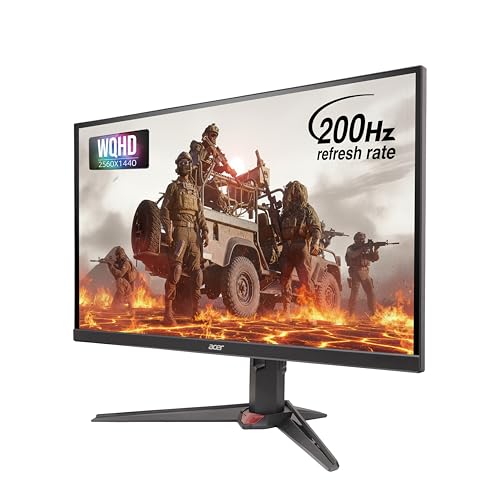
- 【⚡ Ultra-Fast 200Hz Refresh Rate】Experience seamless motion clarity and smoother gameplay with up to 200Hz refresh rate …
- 【🌈 Stunning WQHD IPS Display】Enjoy breathtaking detail and color accuracy on a 27-inch WQHD (2560×1440) IPS panel, suppo…
- 【🔌 Versatile Connectivity & ErgoStand Comfort】Seamlessly connect via 2×HDMI 2.0, 1×DisplayPort 1.4, and Audio Out. Adjus…
Introduction
Finding the perfect gaming monitor feels like a never-ending quest. You want a high refresh rate for silky-smooth gameplay, a fast response time to eliminate ghosting, vibrant colors for immersion, and a resolution that makes everything look crisp. And of course, you don’t want to spend a fortune.
Enter the Acer Nitro XV272U X1 —a 27-inch WQHD (2560×1440) IPS gaming monitor that promises to deliver all of the above at a surprisingly accessible price point. With a 200Hz refresh rate, a blistering 0.5ms GTG response time, and AMD FreeSync Premium support, it ticks all the boxes for competitive gamers. Add in HDR400, 90% DCI-P3 color gamut, and an ErgoStand for maximum adjustability, and it starts to look like a monitor that can handle both gaming and productivity with ease.
But does it live up to the hype? Is the 200Hz refresh rate really noticeable? How does the IPS panel perform in terms of color and contrast? And how does it stack up against competitors from LG and Gigabyte?
In this review, we’ll break down everything you need to know—from design and build quality to real-world gaming performance, color accuracy, and value for money. By the end, you’ll know exactly whether this Acer Nitro monitor deserves a spot on your desk.

Quick Verdict
| Best for | Budget-conscious gamers, esports enthusiasts, content creators, multi-purpose users |
| Not ideal for | HDR purists, those needing USB-C connectivity, professional color graders |
| Overall Rating | 8.3 / 10 |
Short summary: The Acer Nitro XV272U X1 is a feature-packed gaming monitor that offers exceptional value for money. Its 200Hz refresh rate and 0.5ms response time deliver incredibly smooth gameplay, while the WQHD IPS panel provides vibrant colors and sharp details. The ErgoStand offers excellent adjustability, making it comfortable for long sessions. However, the HDR400 implementation is average at best, and the built-in speakers are basic. For gamers and content creators on a budget, this monitor is a compelling choice that punches well above its price class.
Product Overview
| Aspect | Details |
|---|---|
| Brand | Acer |
| Series | Nitro |
| Model | XV272U X1 |
| Screen Size | 27 inches |
| Resolution | WQHD (2560 × 1440) |
| Panel Type | IPS (Agile-Splendor IPS) |
| Refresh Rate | 200Hz |
| Response Time | 0.5ms (GTG) |
| Adaptive Sync | AMD FreeSync Premium |
| HDR | DisplayHDR 400 |
| Color Gamut | 90% DCI-P3 |
| Brightness | 350 nits |
| Contrast Ratio | 1000:1 (typical) |
| Viewing Angles | 178° horizontal / 178° vertical |
| Connectivity | 2× HDMI 2.1, 1× DisplayPort 1.4, Audio Out |
| Speakers | 2W × 2 Stereo |
| Stand | ErgoStand (Height, Swivel, Pivot, Tilt) |
| VESA Mount | 100 × 100 mm |
| Warranty | 3 Years |
The Acer Nitro XV272U X1 is positioned as a high-performance yet affordable gaming monitor. It aims to deliver the sweet spot of 1440p resolution and high refresh rate, making it ideal for both competitive gaming and immersive single-player experiences.
Specifications Table
Note: Specifications are based on available product information. Brightness and contrast may vary slightly by unit.
Key Features
200Hz Refresh Rate for Ultra-Smooth Gameplay
The headline feature of the XV272U X1 is its 200Hz refresh rate. This is significantly higher than the standard 60Hz or even 144Hz monitors, delivering incredibly smooth motion that’s essential for fast-paced competitive games. Whether you’re tracking enemies in a first-person shooter or navigating tight corners in a racing game, the extra fluidity gives you a tangible advantage.
Acer has implemented Dynamic Refresh Rate (DRR) technology, which allows the monitor to adapt its refresh rate dynamically based on the content. This helps reduce power consumption during less demanding tasks while maintaining peak performance during gaming. Through the DisplayPort input, you can also select between 180Hz or 60Hz display modes, giving you flexibility for different gaming or application scenarios.
0.5ms GTG Response Time – Ghosting? Never Heard of It
The 0.5ms (Gray-to-Gray) response time is among the fastest available. This ultra-low response time virtually eliminates motion blur and ghosting, ensuring that fast-moving objects remain sharp and clear. For competitive gamers, this means you can track targets accurately without smearing or trailing artifacts.
It’s worth noting that achieving the absolute 0.5ms response time typically requires the monitor’s “Extreme” overdrive setting, which can introduce some inverse ghosting (overshoot). For most users, the “Normal” or “Fast” overdrive settings offer the best balance between speed and image quality.
WQHD Resolution – The 1440p Sweet Spot
With a 2560 × 1440 resolution, the XV272U X1 offers 77% more pixels than a standard 1080p display. This means sharper images, more screen real estate for productivity, and a more immersive gaming experience. The 27-inch screen size combined with 1440p resolution provides a pixel density of approximately 108 PPI, which is the sweet spot for gaming—sharp enough for detailed textures without requiring the massive GPU power of 4K.
Agile-Splendor IPS Panel – Vibrant Colors and Wide Viewing Angles
The monitor uses Acer’s Agile-Splendor IPS panel technology. IPS panels are known for their superior color reproduction and wide viewing angles compared to TN or VA panels. With 90% DCI-P3 color gamut coverage, this monitor delivers vibrant, lifelike colors that make games and movies pop.
The 178° viewing angles ensure that colors remain consistent even when viewing from the side, which is great for multiplayer sessions or sharing your screen with others.
AMD FreeSync Premium – Tear-Free Gaming
AMD FreeSync Premium support synchronizes the monitor’s refresh rate with your GPU’s frame rate, eliminating screen tearing and stuttering. This results in buttery-smooth gameplay without the input lag typically associated with V-Sync. While FreeSync is designed for AMD GPUs, the monitor is also compatible with NVIDIA G-Sync (though not officially certified), making it a versatile choice for gamers on both sides of the fence.
HDR400 – Entry-Level High Dynamic Range
The monitor supports DisplayHDR 400, the entry-level tier of VESA’s HDR certification. This means it can display HDR content with improved brightness and color compared to standard SDR monitors. However, with a peak brightness of around 350 nits and no local dimming, the HDR experience is limited. For true HDR impact, you’d need to step up to HDR600 or HDR1000 monitors. Still, HDR400 is a nice bonus for users who want to experience HDR content without breaking the bank.
ErgoStand – Maximum Adjustability for Comfort
The ErgoStand is one of the standout features of this monitor. It offers a full range of adjustments:
This level of adjustability ensures you can find the perfect viewing angle for your setup, reducing neck and shoulder strain during long gaming or work sessions. The stand is also VESA compatible (100 × 100mm) if you prefer to mount it on an arm.
Acer Game Mode and Black Boost
The monitor includes Acer Game Mode, which provides up to eight preset display modes including Action, Racing, Sports, and more. These modes optimize the display settings for different game genres, ensuring you get the best visual experience.
The Black Boost feature offers 11 levels of adjustment, allowing you to brighten dark areas of the screen without overexposing bright areas. This is particularly useful for spotting enemies hiding in shadows in competitive shooters.
Connectivity – HDMI 2.1 and DisplayPort 1.4
The XV272U X1 offers solid connectivity options:
The HDMI 2.1 ports are a welcome addition, offering higher bandwidth for future consoles and devices. The DisplayPort 1.4 is the recommended connection for achieving the full 200Hz refresh rate at 1440p resolution.
Design & Build Quality
Appearance
The Acer Nitro XV272U X1 features a sleek, gamer-oriented design with a clean aesthetic. While some Nitro models have aggressive red accents, the XV272U X1 opts for a more understated look that blends well with both gaming and professional setups. The slim bezels on three sides make it ideal for multi-monitor configurations, and the overall build quality feels solid and premium.
Materials and Finish
The monitor is constructed with a combination of sturdy plastics and metal in the stand. The matte finish on the bezels and back panel resists fingerprints and looks professional. The stand has a V-shaped design that provides excellent stability without taking up too much desk space.
ErgoStand – A Cut Above the Rest
The ErgoStand is truly exceptional for a monitor at this price point. The height adjustment, swivel, pivot, and tilt functions are smooth and easy to operate. The ability to rotate the screen into portrait mode is a huge bonus for developers, writers, or anyone who works with tall documents. The stand is sturdy, with no noticeable wobble even at maximum height.
Build Quality and Durability
With a 3-year warranty, Acer demonstrates confidence in this monitor’s build quality. User reviews consistently praise the monitor’s build, with comments like “nice quality and good build” and “great product according to price”. However, as with any electronic device, there are occasional reports of quality control issues, such as “sometimes it shut down and don’t start”. These appear to be isolated incidents rather than widespread problems.
Everyday Performance
Gaming Performance
The XV272U X1 truly shines in gaming. The 200Hz refresh rate paired with the 0.5ms response time delivers an incredibly fluid and responsive experience. Fast-paced games like first-person shooters, racing games, and fighting games feel smooth and responsive. The AMD FreeSync Premium support eliminates screen tearing, making the gameplay experience seamless.
The WQHD resolution provides a significant visual upgrade over 1080p, with sharper details and more immersive environments. The 90% DCI-P3 color gamut ensures that game worlds are vibrant and lifelike. Users have described it as “amazing” and “the best monitor” for gaming.
One user noted: “Amazing monitor, I have purchased it for video editing but it is …”, highlighting its versatility beyond just gaming.
Content Creation and Productivity
The XV272U X1 is not just for gaming—it’s also a capable monitor for content creation. The IPS panel provides accurate colors and wide viewing angles, while the 90% DCI-P3 coverage ensures good color reproduction for photo and video editing. The WQHD resolution offers plenty of screen real estate for multitasking.
However, it’s worth noting that the color calibration out of the box may not be perfect for professional color-critical work. For serious content creators, a calibration tool may be beneficial.
Media Consumption
For watching movies and streaming content, the XV272U X1 delivers a solid experience. The IPS panel provides vibrant colors and good contrast, while the WQHD resolution ensures sharp details. The HDR400 support adds some improvement over SDR, but don’t expect the same impact as high-end HDR monitors.
Built-in Speakers
The 2W × 2 stereo speakers are basic at best. They’re fine for system sounds or casual use, but they lack bass and volume. For gaming or media consumption, you’ll want to use headphones or external speakers.
Heat and Noise
The monitor runs cool and quiet, with no noticeable fan noise. The power supply is internal, which is a nice touch that reduces cable clutter.
Pros
- ✅ 200Hz refresh rate – ultra-smooth gameplay
- ✅ 0.5ms GTG response time – virtually no motion blur
- ✅ WQHD IPS panel – sharp, vibrant, with wide viewing angles
- ✅ 90% DCI-P3 color gamut – excellent color reproduction
- ✅ AMD FreeSync Premium – tear-free gaming
- ✅ ErgoStand – full height, swivel, pivot, and tilt adjustment
- ✅ Slim bezels – great for multi-monitor setups
- ✅ HDMI 2.1 ports – future-proof connectivity
- ✅ 3-year warranty – peace of mind
- ✅ Exceptional value for money – premium features at a budget price
Cons
- ❌ HDR400 is average – limited brightness and no local dimming
- ❌ Built-in speakers are basic – lack bass and volume
- ❌ Color calibration out of the box could be better
- ❌ No USB ports – limited connectivity
- ❌ No USB-C – cannot charge devices or connect laptops with a single cable
- ❌ Occasional quality control issues – isolated reports of monitors failing to start
- ❌ Overdrive settings can cause overshoot – needs adjustment for optimal performance
Comparison with Similar Products
| Feature | Acer Nitro XV272U X1 | LG 27GN800-B | Gigabyte M27Q |
|---|---|---|---|
| Screen Size | 27 inches | 27 inches | 27 inches |
| Resolution | 2560 × 1440 | 2560 × 1440 | 2560 × 1440 |
| Panel Type | IPS | IPS | IPS |
| Refresh Rate | 200Hz | 144Hz | 170Hz |
| Response Time | 0.5ms GTG | 1ms GTG | 0.5ms GTG |
| HDR | DisplayHDR 400 | HDR10 | HDR400 |
| Color Gamut | 90% DCI-P3 | 99% sRGB | 92% DCI-P3 |
| Brightness | 350 nits | 350 nits | 350 nits |
| Adaptive Sync | FreeSync Premium | FreeSync Premium | FreeSync Premium |
| Connectivity | 2×HDMI 2.1, DP 1.4 | 2×HDMI, DP | 2×HDMI, DP, USB-C |
| USB Hub | No | No | Yes (KVM) |
| Stand Adjustability | Height, Swivel, Pivot, Tilt | Height, Tilt | Height, Swivel, Pivot, Tilt |
| Speakers | 2W×2 | No | No |
| Warranty | 3 Years | 3 Years | 3 Years |
| Price Range | Budget | Mid-range | Mid-range |
Discussion
VS LG 27GN800-B: The Acer Nitro XV272U X1 offers a significant advantage with its 200Hz refresh rate compared to the LG’s 144Hz. Both monitors use IPS panels with similar brightness, but the Acer’s 0.5ms response time is faster than the LG’s 1ms. The Acer also includes built-in speakers, which the LG lacks. However, the LG may have slightly better out-of-the-box color calibration. Overall, the Acer offers better value for gamers prioritizing speed.
VS Gigabyte M27Q: This is a closer competition. The Gigabyte M27Q offers a 170Hz refresh rate and a USB-C port with KVM functionality, which is a significant advantage for users with multiple devices. The Acer counters with a 200Hz refresh rate and potentially better availability at a lower price point. If you need USB-C connectivity and KVM, the Gigabyte is the better choice. If you want the highest refresh rate for the lowest price, the Acer wins.
Value for Money
The Acer Nitro XV272U X1 offers exceptional value for money. Available at prices as low as ₹14,372 on Flipkart, it brings premium features like 200Hz refresh rate, 0.5ms response time, and a high-quality IPS panel to a budget-friendly price point.
Who gets the best value?
- Gamers on a budget: You’re getting a 200Hz 1440p monitor for the price of many 1080p 144Hz monitors.
- Esports enthusiasts: The high refresh rate and fast response time give you a competitive edge.
- Content creators: The 90% DCI-P3 color gamut and WQHD resolution make it suitable for photo and video editing.
- Multi-taskers: The ErgoStand and WQHD resolution make it great for productivity.
See if the Acer Nitro XV272U X1 is available at a discount right now!
Who Should Buy It
- Budget-conscious gamers – get premium features without breaking the bank
- Esports enthusiasts – 200Hz and 0.5ms response time give you a competitive edge
- Content creators – 90% DCI-P3 and WQHD resolution for photo and video editing
- Multi-taskers – WQHD resolution and ErgoStand for productivity
- Students – great for both gaming and studies
- Anyone upgrading from 1080p 60Hz – a massive leap in performance and visual quality
Who Should Avoid It
- HDR purists – HDR400 is entry-level and underwhelming
- Users needing USB-C connectivity – no USB-C port for laptops or devices
- Professional color graders – out-of-the-box calibration may not be accurate enough
- Those who prioritize speakers – built-in speakers are basic
- Console gamers – consoles are typically limited to 60Hz or 120Hz, making the 200Hz refresh rate less useful
Buying Guide: What to Look for in a Gaming Monitor
1. Refresh Rate
The refresh rate determines how many frames per second your monitor can display. 144Hz is the sweet spot for most gamers, but 200Hz+ offers even smoother motion for competitive gaming. For casual gamers, 144Hz is sufficient.
2. Response Time
Response time measures how quickly pixels can change color. 1ms or lower is ideal for gaming to reduce motion blur and ghosting. The 0.5ms on the XV272U X1 is among the fastest available.
3. Resolution
1080p is entry-level, 1440p (WQHD) is the sweet spot for 27-inch monitors, and 4K is for those with powerful GPUs. 1440p offers a great balance between visual quality and performance.
4. Panel Type
- IPS: Best color accuracy and viewing angles
- VA: Better contrast but slower response times
- TN: Fastest response times but poor colors and viewing angles
For most users, IPS is the best all-rounder.
5. Adaptive Sync
FreeSync (AMD) and G-Sync (NVIDIA) eliminate screen tearing and stuttering. Check compatibility with your GPU.
6. Connectivity
Consider the ports you need. DisplayPort is best for high refresh rates. HDMI 2.1 is future-proof for consoles. USB-C is useful for laptops and charging.
7. Ergonomics
A good stand with height adjustment, tilt, swivel, and pivot can significantly improve your comfort during long sessions.
8. Color Accuracy
For content creation, look for monitors with high color gamut coverage like 90% DCI-P3 or 100% sRGB.
Frequently Asked Questions
1. What refresh rate does the Acer Nitro XV272U X1 support?
The monitor supports up to 200Hz via DisplayPort. Through the DisplayPort input, you can also select between 180Hz or 60Hz display modes. HDMI connections may be limited to lower refresh rates depending on the version and cable used.
2. Is this monitor G-Sync compatible?
While the monitor is officially AMD FreeSync Premium, many users have reported that it works with NVIDIA G-Sync as well (though it’s not officially certified). You may need to enable it manually in the NVIDIA Control Panel.
3. Does the monitor have built-in speakers?
Yes, it has 2W × 2 stereo speakers. However, they are basic and not suitable for immersive gaming or media consumption.
4. What is the HDR performance like?
The monitor supports DisplayHDR 400, which is entry-level HDR. With a peak brightness of around 350 nits and no local dimming, the HDR experience is limited. It’s a nice bonus but not comparable to high-end HDR monitors.
5. Is the stand adjustable?
Yes, the ErgoStand offers full adjustability including height (up to 150mm), tilt (-5° to 25°), swivel (±20°), and pivot (±90°) for portrait mode.
6. Does it have USB ports?
No, the monitor does not have any USB ports. This means no USB hub, no USB-C, and no KVM functionality.
7. What’s the warranty period?
The monitor comes with a 3-year warranty.
8. Is this monitor good for console gaming (PS5/Xbox)?
Yes, but the 200Hz refresh rate is primarily beneficial for PC gaming. Consoles are typically limited to 60Hz or 120Hz, so you won’t be able to take full advantage of the high refresh rate. However, the WQHD resolution and IPS panel still provide a great gaming experience.
9. What cable should I use for 200Hz?
For the full 200Hz refresh rate at 1440p, you should use the DisplayPort 1.4 cable. HDMI 2.1 may also support high refresh rates, but DisplayPort is the recommended connection.
10. Is this monitor good for photo/video editing?
Yes, the 90% DCI-P3 color gamut and IPS panel make it suitable for content creation. One user noted they purchased it for video editing. However, professional color graders may need a monitor with better out-of-the-box calibration.
Final Verdict
The Acer Nitro XV272U X1 is a standout gaming monitor that delivers exceptional value for money. Its combination of a 200Hz refresh rate, 0.5ms response time, WQHD IPS panel, and 90% DCI-P3 color gamut makes it a versatile choice for gamers, content creators, and productivity users alike.
Strengths:
- Blazing-fast 200Hz refresh rate and 0.5ms response time
- Vibrant WQHD IPS panel with excellent colors
- Highly adjustable ErgoStand for maximum comfort
- AMD FreeSync Premium for tear-free gaming
- Exceptional value for money
Weaknesses:
- HDR400 implementation is average
- Built-in speakers are basic
- No USB ports or USB-C connectivity
- Out-of-the-box color calibration could be better
Recommendation: If you’re a gamer on a budget looking for a monitor that can handle competitive gaming, content creation, and everyday productivity, the Acer Nitro XV272U X1 is an outstanding choice. It offers features that typically cost significantly more, making it one of the best value monitors in its class. However, if you need USB-C connectivity, better HDR performance, or professional-grade color accuracy, you may want to consider other options.
Overall Rating: 8.3 / 10
Don’t miss out on this budget gaming monitor!
Suggested External References
- Acer official website for product specifications
- Flipkart product page
- More from Acer Nitro Series
- VESA DisplayHDR certification details
- AMD FreeSync Premium official page
Disclaimer: This review is based on product information available at the time of writing and verified customer feedback. Specifications, availability, and pricing may change. Always verify product details before purchasing. The reviewer does not claim personal ownership of the product.